Vale for agents
Your assistant writes the docs. Something should check them.
A model writes plausible prose and plausible linter rules with equal confidence. Agent tools put Vale in the loop: an assistant that sets Vale up in one prompt, shapes it to how your team writes, and is checked by it on every file and commit.
/plugin marketplace add vale-cli/agent-tools
/plugin install vale@agent-tools
Type both in Claude Code. The second restarts the session, which registers the hooks and the MCP server. The plugin drives the Vale binary and installs it if it is missing. The setup guide walks through the whole process.
Skills
13 of them: one-prompt onboarding, style choices, rules from your style guide, a written guide, vocabularies, fixes, CI, and commit messages.
Hooks
Lint each file the assistant writes and each commit it makes, and hand the alerts back in the same turn.
More plugins
A setup pane beside the chat, Vale as tools the assistant calls directly, and the language server.
MCP server
The engine as tools, so a rule the assistant writes is diagnosed and stress-tested before it reaches your repository.
Set up in one prompt
In a repository that has prose and no Vale yet, one skill does the whole job: not a configuration and two thousand alerts, but a baseline the team can keep.
/vale:onboard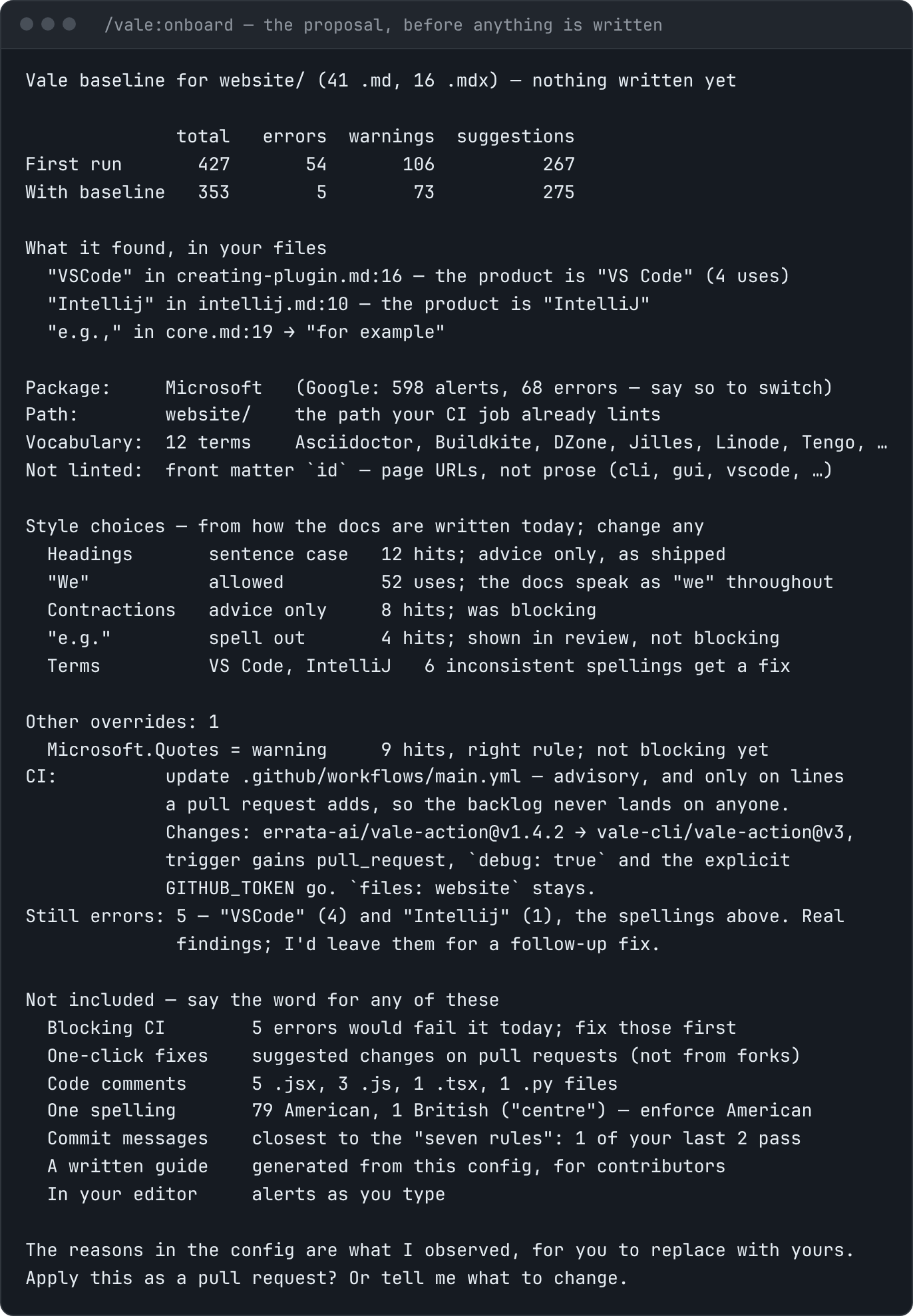
Look, draft, one yes, apply
- It surveys the repository: where the prose is, translated docs, source code, a written style guide, existing CI.
- It tries the style packages against your docs in a temp directory and takes the quieter one.
- It drafts a vocabulary, a decision for each rule that would block, and your style choices, read from how the docs are written today.
- It shows one proposal: what it found in named files, the before and after counts, and where Vale will run.
- On a yes, it applies all of it and opens a pull request whose description is the proposal, so the team reviews what you did.
A word list kept for cspell or another spell checker is carried over into the vocabulary. CI starts advisory and looks only at the lines a pull request adds, so the backlog lands on nobody.
Everything else is offered, not switched on
The baseline is the smallest useful one: English prose, one package, advisory CI. The rest is listed in the proposal with one fact from your repository, and each is a separate yes.
- Blocking checks once the remaining errors are fixed
- One-click fixes suggested changes on pull requests
- Translated docs a section and a dictionary per language
- Code comments Go, Python, TypeScript, and about twenty more
- One spelling American, British, Australian, Canadian
- Commit messages the convention your history already follows
- Your style guide turned into tested rules
- A written guide generated from the configuration
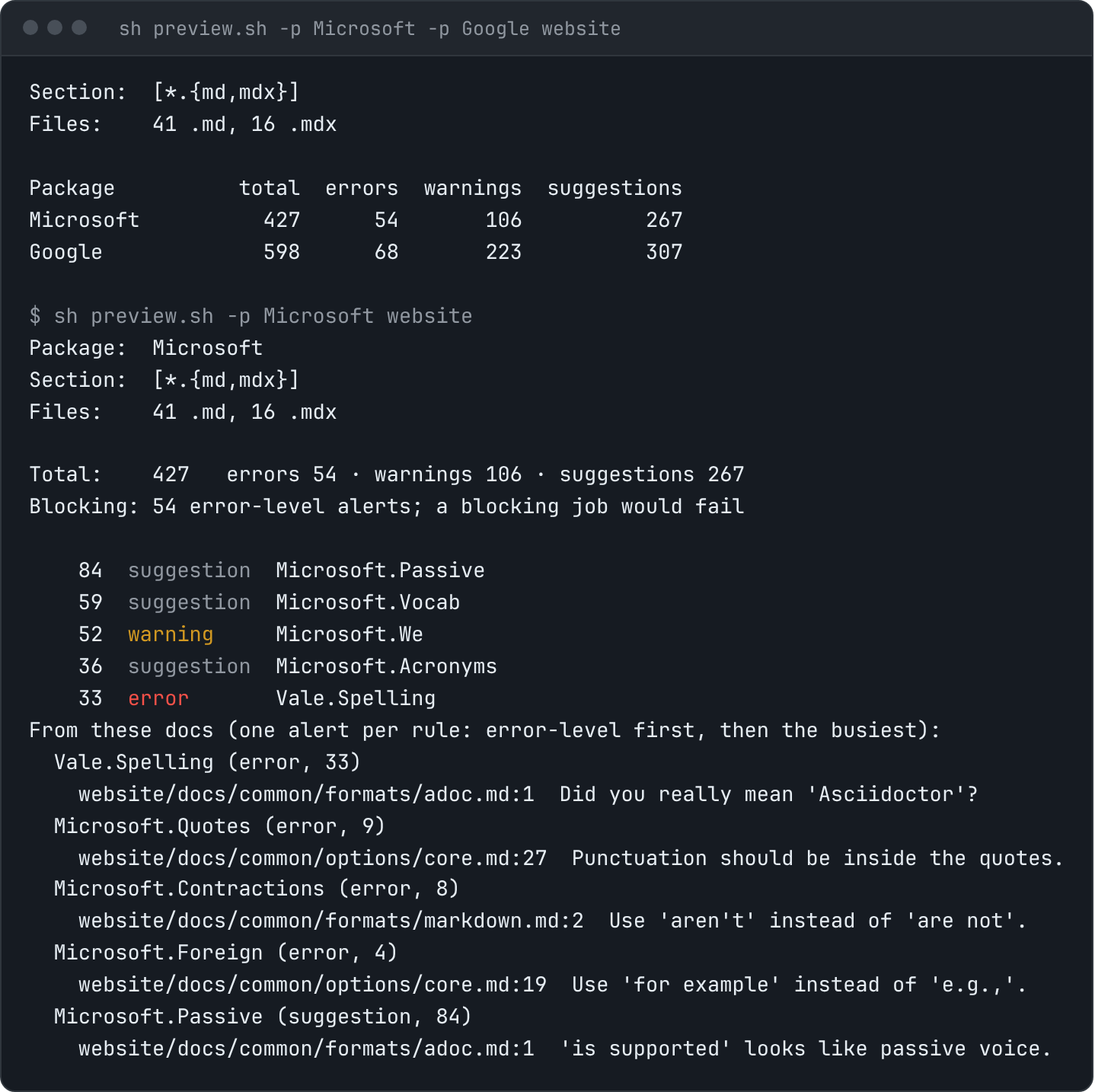
13 skills
Ask in your own words and the assistant reaches for the one that fits, or call it by name. Each checks its prerequisites before touching anything, and one that cannot run Vale says so instead of improvising.
Get set up
From no Vale to a baseline the team can keep.
- /vale:onboard
“set up vale end to end”
Try the style packages against your docs in a temp directory, draft a vocabulary, a decision per noisy rule, and the CI job, and show one proposal with before and after counts.
Nothing is written until you say yes, and the result is a pull request whose description is the proposal.
- /vale:setup
“add prose linting”
Install Vale, write a .vale.ini that matches the formats actually present, sync the styles, and get a first run. Covers translated docs and the comments in source code.
Points Vale at the prose rather than the whole repository, and reports the first-run count instead of hiding it behind MinAlertLevel.
- /vale:doctor
“why is the hook silent”
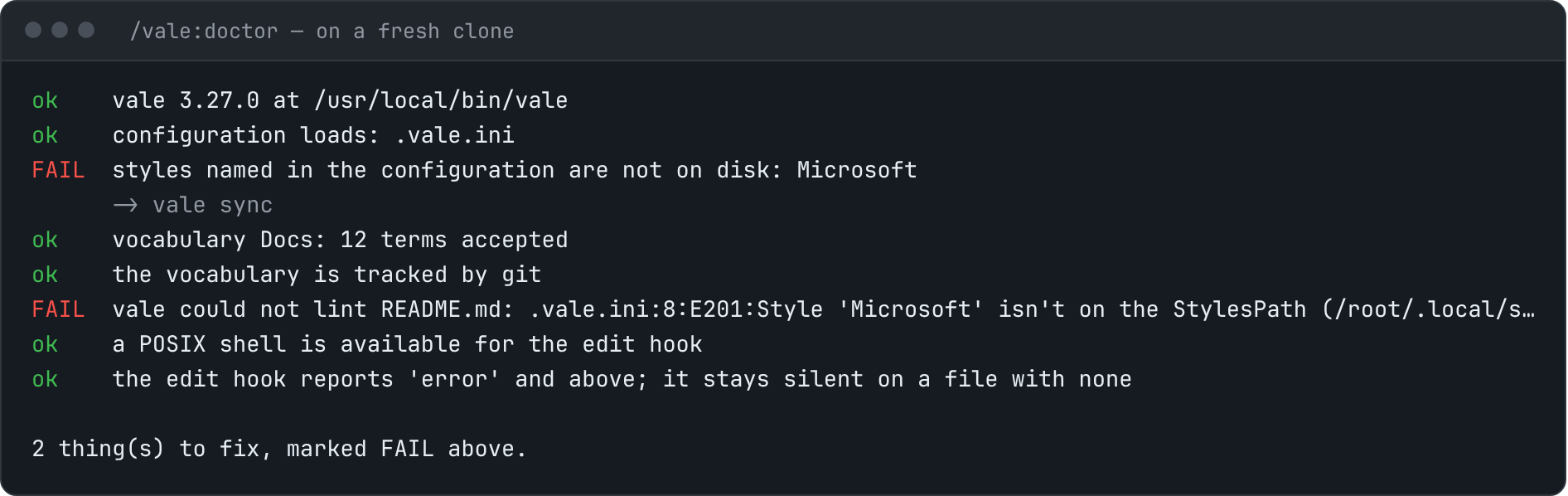
Check a setup end to end: the binary, the configuration, the synced styles, the vocabulary, and a real run on a real file.
Gives the command that fixes each thing that is broken, and fixes nothing without being asked.
Make the style yours
House choices, your own rules, and the guide that explains them.
- /vale:tune
“use title case headings”
Change one style choice in plain words: headings, contractions, “we”, passive voice, preferred terms. Ships tested templates for the choices no package covers.
Counts what the change flags before writing it, and records the reason beside the line in the configuration.
- /vale:from-guide
“enforce our style guide”
Turn a written style guide into the project’s own rules, each linked to its section and tested against the guide’s own do and don’t examples.
Says which statements cannot be checked instead of approximating a judgment call with a word list.
- /vale:rule
“flag this phrase”
Write one rule for a house convention, with test cases beside it, and prove it with vale test and a run on the real corpus.
A rule that matches nothing loads and reports success, so every rule ships with a case that fires and a case that must not.
- /vale:write-guide
“document our vale rules”
Write a readable style guide from the configuration: what blocks a merge, the style choices and why, the vocabulary. In Markdown, MDX, AsciiDoc, reStructuredText, Org, or HTML.
Every claim about what is enforced is read from the configuration, and no reason is stated that the project did not record.
- /vale:vocab
“stop flagging our product name”
Add project terms to a vocabulary, import a word list kept for another spell checker, and set up a regional or other-language dictionary.
The alternative, disabling Vale.Spelling over one product name, stops checking every other word in the repository.
- /vale:triage
“where do we start”
Turn a first run on an existing corpus into a decision per rule: fix, keep, downgrade, or switch off, written into .vale.ini with the reason.
Reports which few rules produce most of the output, so the answer is a plan rather than a raised alert level.
- /vale:ignore
“it’s flagging our shortcodes”
Take text that is not prose out of Vale’s view: shortcodes, templating tags, generated blocks, one quoted passage.
Uses the narrowest tool that works, a pattern or a named-rule comment, so a false positive never costs a rule its true ones.
Keep it passing
Fixes, the pipeline, and the commit log.
- /vale:fix
“make vale pass”
Fix alerts a file at a time, applying the replacement each rule defines, one pull request per file.
Error level by default, markup preserved, one branch per file, and never silencing a rule to make the run pass.
- /vale:ci
“run this on PRs”
Generate the GitHub Actions workflow or the pre-commit entry from what the repository already has. Asks what it should look at, what to report, and when to fail.
Says plainly whether the job is advisory or blocking, since only error sets a non-zero exit code.
- /vale:commits
“lint our commit messages”
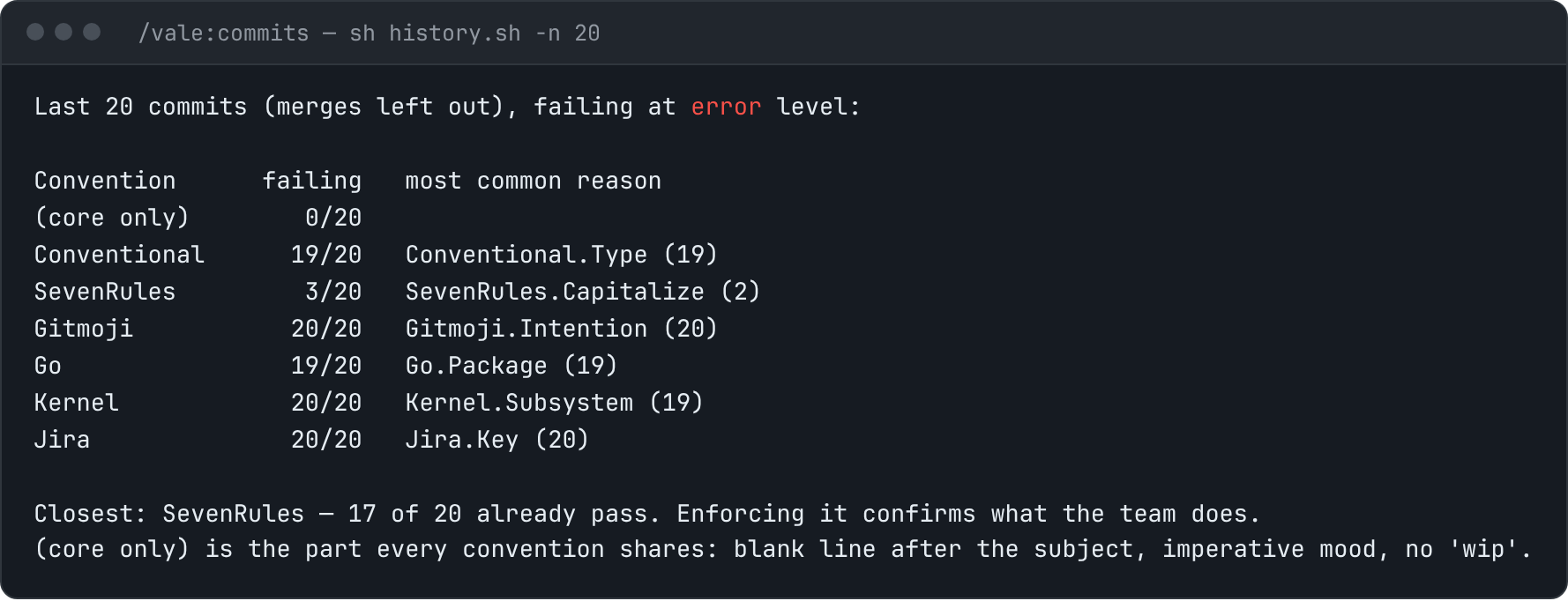
Score your recent history against the common conventions, set up the one it already follows, and add the hook and the CI check.
Says how much of the history passes a convention before a hook starts rejecting commits.
A style guide, in both directions
From a guide to rules. /vale:from-guide reads your written guide and sorts every statement:
already covered by a package, a rule to write, a vocabulary entry, or not checkable. Each new
rule links to its section and takes its tests from the guide’s own do and don’t examples. “Be
warm” is reported as needing a person, not approximated.
From rules to a guide. /vale:write-guide writes the page a new contributor can read: what
blocks a merge, the style choices and why, the words you use. The rule table is read from the
configuration by a script and sits between markers, so it can be regenerated without touching
the prose.
Type /vale: and all 13 should complete. The skills page has the options for assistants other than Claude Code.
The hooks
Two checks that run on the assistant’s work, not yours: one when it writes a file, one when it makes a commit. Both are silent unless there is something to fix.
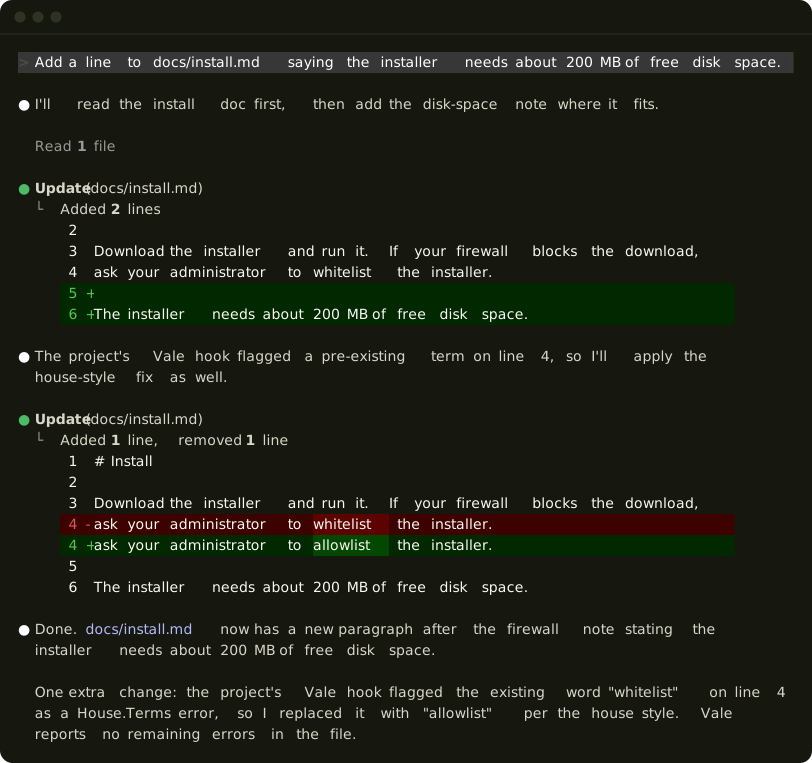
What the edit hook hands back, word for word:
Vale reports 1 alert(s) at error level or above in this file:
  line 4: House.Terms [error] — Use 'allowlist' instead of 'whitelist'.

Fix these before moving on, preserving the markup exactly. Do not disable a rule to clear one.
Silent unless there is something to fix
No Vale binary, no configuration, a file Vale does not lint, or a clean run: the hook says nothing. It covers Markdown, MDX, AsciiDoc, reStructuredText, Org, and plain text, and source files too when your configuration has a section for them, so a typo in a doc comment is caught the same way.
Anchored at the file's own configuration
The hook walks up from the edited file to the nearest .vale.ini and runs Vale from there, so a section like [docs/**/*.md] matches wherever the session started. A configuration
that fails to load is reported, not passed over.
Which alerts reach the assistant
Errors only, by default: a project's warnings and suggestions are advisory by its own
choice. For a style whose rules are deliberately advisory, run /plugin and set Alert level the edit hook reports.
| Value | Relays |
|---|---|
| error | Errors · The default. |
| warning | Errors and warnings |
| suggestion | Everything |
Vale's own MinAlertLevel decides what is reported at all, and this setting
decides what is passed on, so raising it past MinAlertLevel gains nothing.
To override it for one session:
VALE_HOOK_LEVEL=warning claudeCommit messages
The second hook runs after the assistant makes a commit. If your configuration has a [COMMIT_EDITMSG] section, it lints the message git just recorded and
hands back any error-level alerts, with the instruction to amend if the commit has not been
pushed. A project’s own commit-msg hook is installed per clone, and an assistant’s checkout
usually has not run that setup; this gives its commits the same check. Without the section
it does nothing. /vale:commits writes it.
Packages = Microsoft, Commits

[COMMIT_EDITMSG]
BasedOnStyles = Commits, SevenRules
Nothing happened
That is often correct. Ask for /vale:doctor, or check by hand; no
error lines means the hook has nothing to say.
vale ls-config >/dev/null && echo "config resolves"
vale --no-exit --output=line path/to/file.md   # any error lines?
More plugins
Three more plugins come from the same marketplace. Each is experimental and installs on its own, beside the main one.
The setup pane vale-onboard
The onboarding proposal, drawn beside the chat: a button per style package with its alert count, a button on each rule that makes it quieter, the unknown words to tick, and where Vale should run. Every press re-runs the preview, so the count is a real one. Apply hands the result to the assistant; nothing is written before that.
/vale-checks opens the “where it runs” part alone in a repository that already has Vale.
/plugin install vale-onboard@agent-tools
/vale-onboard
Vale as tools vale-tools
Two tools the assistant calls with no shell command: lint, which checks a draft or a file against the project’s rules and returns each alert with the fix its rule carries, and test, which runs the cases beside the project’s own rules. Because lint takes text, a paragraph or a commit message can be checked before it is written.
Works on Windows without Git Bash. In the desktop app it adds “Check with Vale” and “Add to Vale vocabulary” to the right-click menu.
/plugin install vale-tools@agent-toolsThe language server vale-lsp
Connects Claude Code to vale-ls, so alerts arrive as diagnostics after an edit, the way a type error does for code. Errors only, matching the hook’s default.
An alternative to the edit hook: install one or the other, or every alert arrives twice. Needs vale-ls on your PATH.
/plugin install vale-lsp@agent-tools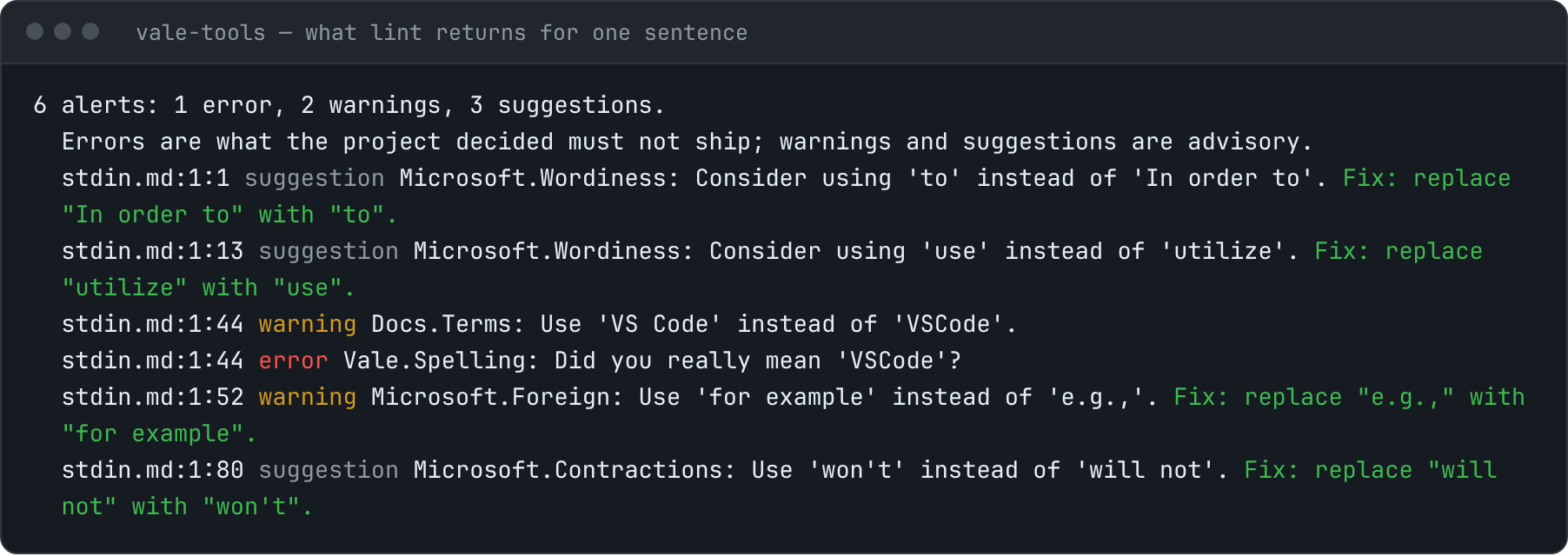
The MCP server
The skills test a rule the way anyone can, with vale test and cases kept beside it. The MCP server goes further than a pass or a fail, by handing the assistant the engine itself.
diagnose_rule says why a pattern does not match, stress_rule finds the false positives the cases miss, diff_rule shows what an edit changes in a rule already in use, and audit_style reports what a style costs to run.
It is hosted by Vale CMS and needs a Pro or Site subscription. Claude Code prompts you to sign in the first time a tool is called. Until then every call returns a 401 that names Vale CMS, which is the server working, not a broken install.
{
  "mcpServers": {
    "vale-cms": {
      "type": "http",
      "url": "https://api.vale.sh/mcp"
    }
  }
}
What each piece needs
- Skills
- The vale binary on PATH; onboard and setup install it if it is missing. fix, triage, and vocab read Vale’s JSON with jq. tune and from-guide test their rules with vale test, which needs Vale v3.24.0 or later.
- Hooks
- The vale binary and any POSIX shell. On Windows that means Git Bash, which Git for Windows includes; without it the hooks do nothing and the skills do their scripted steps by hand.
- More plugins
- The vale binary. The pane needs a POSIX shell, the tools do not, and the language server needs vale-ls.
- MCP server
- A Vale CMS Pro or Site subscription. Nothing else here depends on it.
The pieces are independent: a missing one is quiet and the others keep working. The skills and the hooks run the CLI on your machine, against your files.
Other assistants
skills/ in vale-cli/agent-tools is a plain skills directory. Copy
the folders you want to wherever your assistant reads them, such as .claude/skills/ or .cursor/skills/. Any
coding agent that can run a shell can do the onboarding from one prompt:
Clone https://github.com/vale-cli/agent-tools into a temp directory, then
follow skills/onboard/SKILL.md to set up Vale in this repository.
For one with no skill support, hand it AGENTS.md, which covers the same ground as prose.